Barbosa - Google Slide Template
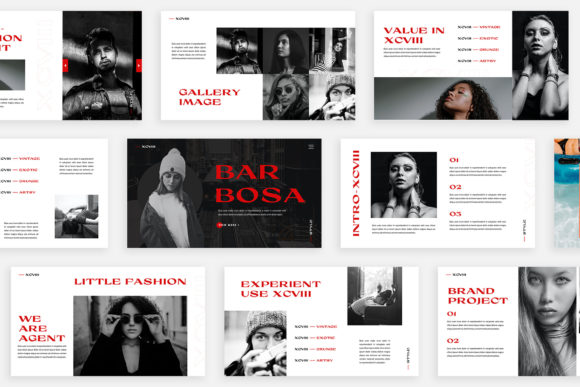
Looking for a slide deck that stands out from the crowd? The Barbosa - Google Slide Template offers a fresh take on presentation design, blending functionality with creativity. With 30 unique slides, each crafted with a distinct layout and purpose, this template is ideal for professionals who want to deliver engaging content without compromising on visual appeal.
Whether you're presenting to clients, sharing ideas with colleagues, or showcasing your latest project, the Barbosa template provides a seamless experience. Its high-resolution Full HD format ensures clarity on any screen, while the automatic color change feature lets you customize the theme effortlessly to match your brand or mood.
Why Choose Barbosa - Google Slide Template?
The Barbosa - Google Slide Template isn't just another slide deck—it's a versatile tool designed to meet diverse needs. Here’s what makes it stand out:
- Unique Slides: Each of the 30 slides has a different structure, ensuring variety and preventing monotony in your presentations.
- High-Resolution Design: Created at 1920×1080 pixels, the template delivers crisp visuals that look great on any display.
- Color Customization: Easily switch between multiple theme colors to align with your brand identity or event theme.
- Magazine Style Layouts: Inspired by print media, these layouts offer a modern, clean aesthetic that's perfect for digital storytelling.
- Drag-and-Drop Functionality: No design skills required—simply drag your images into place and let the template do the rest.
- Free Fonts Included: Access to free fonts through a provided PDF guide ensures your presentation looks professional without extra costs.
Creative Possibilities with Barbosa
The Barbosa template opens up endless creative possibilities. For marketers, it can be used to craft compelling campaign proposals or client reports. Designers can leverage its magazine-style layouts to create visually rich portfolios. Educators might find it useful for creating interactive lesson plans or student presentations.
Consider using the lookbook-style slides for product showcases, portfolio displays, or even travel blogs. The flexibility of the template allows users to adapt it across various industries—from fashion to technology—without needing to start from scratch.
Real-World Applications
Imagine you're a freelance designer preparing a pitch for a new client. Using the Barbosa template, you could create a sleek, professional-looking proposal with custom color schemes, high-quality image placeholders, and easy-to-edit text sections. This not only saves time but also ensures consistency in your branding.
For entrepreneurs launching a startup, the Barbosa template can serve as a foundation for investor pitches, business plans, or marketing strategies. Its varied layouts help keep the content engaging, while the drag-and-drop features make customization simple.
How to Maximize Your Use of the Template
To get the most out of the Barbosa - Google Slide Template, consider the following tips:
- Plan Your Content First: Before diving into design, outline your key messages and structure your slides accordingly. This helps maintain a clear narrative throughout the presentation.
- Customize Colors Strategically: Use the automatic color change feature to reflect your brand’s palette or the tone of your message. A cohesive color scheme enhances readability and professionalism.
- Use High-Quality Images: While the template includes image placeholders, ensure your final images are high resolution and relevant to your content. This improves the overall impact of your slides.
- Keep Text Concise: Avoid overcrowding slides with too much text. Use bullet points, subheadings, and white space to keep information digestible.
- Explore Layout Options: Experiment with different slide types to vary the visual rhythm of your presentation. Mix infographic-style slides with text-heavy ones for a balanced flow.
Adapting Barbosa for Different Audiences
The versatility of the Barbosa template makes it suitable for a wide range of audiences. For instance, when targeting younger demographics, you can use vibrant color themes and dynamic layouts. When presenting to executives, opt for a more minimalist, data-driven approach with clean typography and structured content.
If you're targeting an international audience, consider using multilingual support and culturally appropriate imagery. The template’s drag-and-drop functionality makes it easy to update content quickly, whether you're tailoring a presentation for a local market or a global team.
Practical Tips for Consistency
Maintaining consistency in your presentation is key to building credibility and clarity. Stick to one or two font styles, use consistent color schemes, and follow a logical flow from introduction to conclusion. These small details can significantly enhance the effectiveness of your message.
Additionally, always review your slides for alignment, spacing, and contrast. A well-organized presentation not only looks better but also helps your audience focus on your content rather than the design itself.
The Barbosa - Google Slide Template empowers users to create visually stunning and functionally sound presentations. Whether you're a marketer, educator, or entrepreneur, this template offers the tools you need to communicate effectively and impressively. With its unique designs, customizable features, and practical layout options, it’s no wonder that professionals across various fields are turning to Barbosa for their presentation needs.